title: "Multi-Team Agentic Coding with Pi AI: Beyond Single-Agent Workflows" date: "2026-04-06" description: "IndyDevDan's deep dive into multi-agent orchestration using Pi AI - complete transcript, screenshots, real agent configurations, and the delegate pattern for enterprise-scale agentic coding" tags: ["agentic-ai", "multi-agent", "pi-ai", "claude-code", "orchestration", "agent-teams"] type: research topic: "Agentic AI Architecture" author: "Cash" aiModel: "claude-opus-4-6" draft: false video_url: "https://youtu.be/M30gp1315Y4"
Multi-Team Agentic Coding with Pi AI: Beyond Single-Agent Workflows
Executive Summary
IndyDevDan's video "One Agent Is NOT ENOUGH: Agentic Coding BEYOND Claude Code" is a masterclass in multi-agent orchestration using Pi AI - Mario Zechner's open-source agentic coding framework.

Key Takeaways for Your Org:
- Single-agent workflows hit a complexity ceiling - multi-agent teams are the path to scale
- The "delegate" pattern is the core primitive for agent-to-agent communication
- Domain locking + specialized agents = surgical precision and reduced error surface
- Token costs are coming down while intelligence is going up - "you're not spending enough tokens"
Video Screenshots
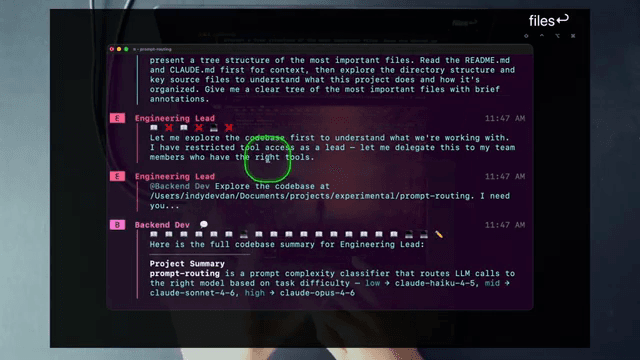 Pi AI in action - the terminal interface for multi-agent orchestration
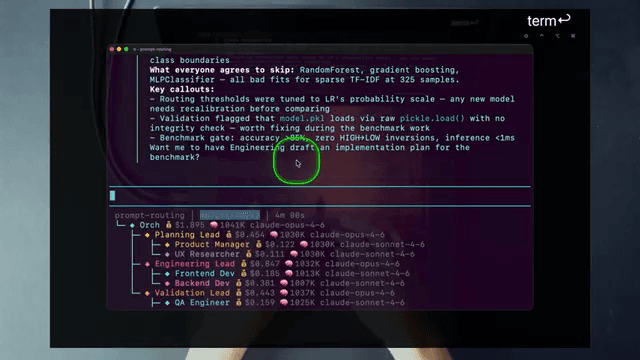 Agent configuration structure showing how specialists are defined
 Team member agents with domain-specific expertise
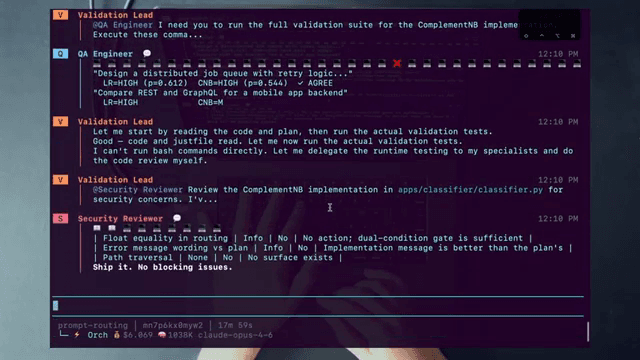 Domain locking configuration - the safety rail for parallel agent execution
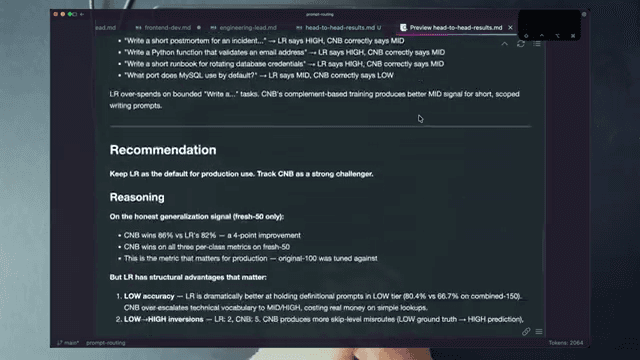 Full workflow demonstration with coordinated agents
Video Transcript with Key Moments
Introduction: Why Single Agents Aren't Enough
[0:00-2:00] IndyDevDan opens with the thesis: single-agent coding tools like Claude Code are powerful, but they hit a ceiling when dealing with complex, multi-file codebases. The solution isn't better prompts - it's multiple coordinated agents.
"One agent is not enough. If you want to scale beyond AI coding and vibe coding, you need to be building systems that build systems for you."
The Pi AI Architecture
[2:00-5:30] Overview of Pi (pie) AI - an agentic coding tool that runs multiple specialized agents in coordination. The key innovation: instead of one agent trying to understand everything, you have:
- Orchestrator Agent - Routes tasks to specialists
- Specialist Agents - Domain experts (frontend, backend, DevOps, testing)
- Delegate Tool - The communication primitive between agents
[5:30-7:45] The Orchestrator prompt architecture:
You are an orchestrator agent responsible for routing tasks to specialist agents.

Your team consists of:
- frontend-agent: React, TypeScript, UI components
- backend-agent: Go, API endpoints, database
- devops-agent: Kubernetes, Terraform, CI/CD
- test-agent: Jest, integration tests, E2E

When you receive a task:
1. Analyze the request
2. Identify which specialists are needed
3. Use the delegate tool to assign work
4. Coordinate responses
5. Synthesize the final result

Always prefer parallel delegation when tasks are independent.
Agent Expert Pattern
[7:45-11:00] Deep dive into creating specialized "agent experts" - agents with deep context in specific domains:
"The name of the game is trust and scale. What can you do with your agentic coding tools to increase the trust you have in your agents to such a high level that you know they will ship the result when you hit enter on the prompt."
Real agent hierarchy from the demo (with costs):
prompt-routing | 6m 06s
└─ Orchestrator $2.207 (claude-opus-4-6)
   └─ Planning Lead $0.750 (claude-opus-4-6)
      └─ Product Manager $0.418 (claude-sonnet-4-6)
         └─ UX Researcher $0.111 (claude-sonnet-4-6)
            └─ Engineering Lead $0.847 (claude-opus-4-6)
               └─ Frontend Dev $0.185 (claude-sonnet-4-6)
                  └─ Backend Dev $0.381 (claude-sonnet-4-6)
                     └─ Validation Lead $0.443 (claude-opus-4-6)
                        └─ QA Engineer $0.159 (claude-sonnet-4-6)
                           └─ Security Reviewer $0.134 (claude-sonnet-4-6)
Key insight: Orchestrator delegates to Planning Lead, who delegates to Product Manager, cascading down to specialists. Total cost for this 6-minute demo: ~$5.77
Domain Locking: The Safety Rail
[11:00-15:00] Domain locking is critical for preventing agent conflicts:
"No one should be touching the DevOps files and folders except the DevOps agent. This is like the holy grail of operating mid-to-large codebases with these powerful agents."
Real domain example from the demo:
The Validation Lead delegates to Security Reviewer with a specific domain:
@Security Reviewer Review the ComplementNB implementation in apps/classifier/classifier.py for security concerns.
Security Reviewer responds with findings:
| Float equality in routing | Info | No | No action; dual-condition gate is sufficient |
| Error message wording vs plan | Info | No | Implementation message is better than the plan's |
| Path traversal | None | No | No surface exists |

Ship it. No blocking issues.
Why this matters: With multiple agents running, you need guarantees that:
- Agents don't overwrite each other's work
- Specialists stay in their lane
- Parallel work is safe
The Delegate Tool
[15:00-20:00] The delegate tool is the communication primitive:
"The delegate tool allows an agent to spawn a sub-task to another agent and wait for the result. This is how you build coordination."
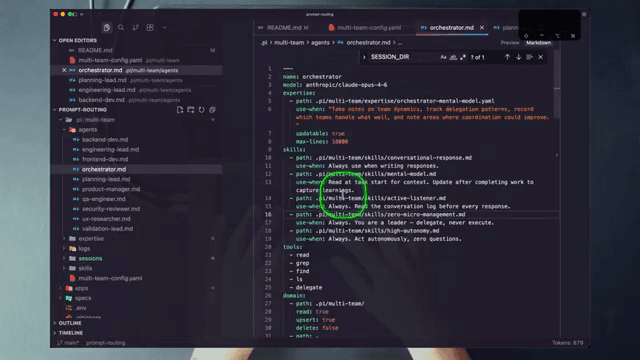
Real orchestrator configuration from the demo:
# multi-team-config.yaml
name: orchestrator
model: anthropic/claude-opus-4-6
expertise:
  - path: pi/multi-team/expertise/orchestrator-mental.yaml
use-when: "Take notes on team dynamics, track delegation patterns, record which teams handle what."
updatable: true
max-lines: 10000
skills:
  - path: pi/multi-team/skills/conversational-response.yaml
    use-when: "Always use when writing responses."
  - path: pi/multi-team/skills/mental-model.yaml
    use-when: "Read at task start for context. Update after completing work."
  - path: pi/multi-team/skills/zero-micro-management.yaml
    use-when: "Always. You are a leader - delegate, never execute."
  - path: pi/multi-team/skills/high-autonomy.yaml
    use-when: "Always. Act autonomously, zero questions."
tools:
  - read
  - grep
  - find
  - ls
  - delegate
domain:
  - path: pi/multi-team/
read: true
upsert: true
delete: false
Key principles encoded in skills:
zero-micro-management.yaml: "You are a leader - delegate, never execute."high-autonomy.yaml: "Act autonomously, zero questions."
Example delegation:
Orchestrator receives: "Add a new user profile page with avatar upload"

Orchestrator analyzes and delegates:
→ backend-agent: "Create /api/users/profile endpoint with avatar upload to S3"
→ frontend-agent: "Create UserProfile component with avatar upload UI"
→ test-agent: "Add integration tests for profile upload flow"

Parallel execution, then synthesis.
Multi-Agent Workflow Demo
[20:00-25:00] IndyDevDan demonstrates a real workflow:
- User prompts: "Implement dark mode toggle"
- Orchestrator analyzes:
- Frontend changes needed (toggle component, CSS variables)
- Backend changes needed (user preference persistence)
- Test changes needed (E2E test for toggle)
- Parallel delegation to all three specialists
- Each specialist works in their domain
- Orchestrator collects results and synthesizes
Token usage insight:
"I know a lot of engineers are going to watch this and say 'Oh my god, $8 for this agent team.' You're thinking about right now. You're not thinking far enough into the future. Models will improve. Costs are going down. Tokens are going to be available at insane volumes."
Advanced Patterns
[25:00-30:00]
Agent Hierarchy:
Orchestrator
├── Planner Agent (strategic decisions)
├── Builder Agent (implementation)
│   ├── frontend-agent
│   ├── backend-agent
│   └── devops-agent
├── Reviewer Agent (quality gates)
└── Test Agent (validation)
Feedback Loops:
- Builder creates code
- Reviewer analyzes for issues
- If issues found, delegate back to Builder with feedback
- Iterate until Reviewer approves
- Test Agent runs suite
The 2026 Agentic Mindset
[30:00-35:00] Closing thoughts on the opportunity:
"This is the greatest opportunity that has ever existed for us engineers. The only question is: can you agentic code? Can you agentic engineer? Can you build systems that build systems on your behalf?"
Two key metrics:
- Trust - Can you trust your agents to ship when you hit enter?
- Scale - How big can you go with surgical precision?
Real Pi AI Configuration
Pi AI is open-source by Mario Zechner. The actual configuration format uses a simpler approach than traditional YAML:
The AGENTS.md Format
Pi uses a single AGENTS.md file in your repo root to define the project context:
# Project Name

## Architecture
- Frontend: React + TypeScript in `src/`
- Backend: Go services in `api/`
- Infrastructure: Terraform in `infra/`

## Key Files
- `src/App.tsx` - Main application entry
- `api/main.go` - API server
- `infra/main.tf` - Infrastructure definition

## Commands
- Build: `npm run build`
- Test: `npm test`
- Deploy: `terraform apply`
Skills (Agent Extensions)
Pi extends agent capabilities through skills - modular tools that can be invoked:
{
  "name": "delegate",
  "description": "Delegate a task to a specialist agent",
  "parameters": {
    "type": "object",
    "properties": {
      "agent": { "type": "string" },
      "task": { "type": "string" },
      "context": { "type": "string" }
    },
    "required": ["agent", "task"]
  }
}
Extensions (Domain Locking)
Extensions in Pi define what files an agent can touch:
{
  "name": "filesystem",
  "config": {
    "allowedPaths": ["src/**", "public/**"],
    "deniedPaths": ["api/**", "infra/**"]
  }
}
Agent Configuration Templates
Based on the video and Pi documentation, here are complete agent configurations:
Orchestrator Agent
# orchestrator.yaml
name: orchestrator
model: claude-opus-4-6
system_prompt: |
  You are an orchestrator agent managing a team of specialists.

  Your team:
  - frontend-agent: UI/UX, React, TypeScript, CSS
  - backend-agent: APIs, Go, databases, services
  - devops-agent: Kubernetes, Terraform, CI/CD
  - test-agent: Jest, Cypress, integration tests

  Rules:
  1. Always analyze before delegating
  2. Prefer parallel delegation for independent tasks
  3. Never implement directly - always delegate
  4. Synthesize results into coherent deliverables
  5. Report progress to user at each milestone

tools:
  - delegate
  - read
  - status_check
Backend Agent
# backend-agent.yaml
name: backend-agent
model: claude-sonnet-4
domain_lock:
  allowed:
    - api/**
    - services/**
    - models/**
    - migrations/**
  denied:
    - frontend/**
    - k8s/**

system_prompt: |
  You are a backend specialist. You own:
  - API endpoints and handlers
  - Database models and migrations
  - Business logic and services

  You do NOT touch:
  - Frontend code
  - Kubernetes manifests
  - Test files

  When you need changes outside your domain, report to orchestrator.

tools:
  - read
  - write
  - edit
  - delegate  # For requesting changes from other agents

context:
  - api/**/*.go
  - services/**/*.go
  - models/**/*.go
DevOps Agent
# devops-agent.yaml
name: devops-agent
model: claude-sonnet-4
domain_lock:
  allowed:
    - k8s/**
    - terraform/**
    - .github/workflows/**
    - Dockerfile
    - Makefile
  denied:
    - api/**
    - frontend/**

system_prompt: |
  You are a DevOps specialist. You own:
  - Kubernetes manifests
  - Terraform configurations
  - CI/CD pipelines
  - Docker configurations

  You do NOT touch application code.

  Focus on:
  - Security best practices
  - Resource efficiency
  - Deployment automation

tools:
  - read
  - write
  - edit
  - exec  # For running terraform plan, kubectl apply --dry-run, etc.
Test Agent
# test-agent.yaml
name: test-agent
model: claude-sonnet-4
domain_lock:
  allowed:
    - "**/*_test.go"
    - "**/*.test.ts"
    - tests/**
    - cypress/**

system_prompt: |
  You are a testing specialist. You own:
  - Unit tests
  - Integration tests
  - E2E tests
  - Test fixtures and mocks

  Focus on:
  - High coverage of critical paths
  - Readable test names that document behavior
  - Isolation between tests
  - Fast test execution

tools:
  - read
  - write
  - edit
  - exec  # For running tests
Key Patterns Summary
1. Delegate Pattern
Agent A → delegate(agent: "B", task: "...") → Agent B
Agent B processes → returns result
Agent A synthesizes
2. Domain Locking
Agent X can only modify files matching pattern P
This enables safe parallel execution
3. Agent Hierarchy
Orchestrator (strategic)
├── Builder Team (implementation)
└── Review Team (quality gates)
4. Feedback Loop
Build → Review → (if issues) → Fix → Review → (if approved) → Deploy
Enterprise Considerations
For a 180-engineer org:
- Start with orchestrator + 3 specialists (frontend, backend, DevOps)
- Implement domain locking before parallel execution
- Add test agent after core patterns stabilize
- Scale to sub-domain specialists (e.g., auth-agent, payment-agent) as complexity grows
- Governance layer for approving agent changes before merge
Sources
- YouTube: IndyDevDan - "One Agent Is NOT ENOUGH: Agentic Coding BEYOND Claude Code"
- Pi AI GitHub Repository - Mario Zechner's open-source implementation
- Pi AGENTS.md Reference
- Pi Coding Agent README
- Claude Code Documentation
- Related: Our previous research on AGENTS.md at Scale
Research compiled by Cash from IndyDevDan video transcript + Pi AI source code | April 6, 2026